Apple’s Sold Out 2M Units iPhone 5 – During The Opening Weekend In China

Apple said the company sold out 2 million units of iPhone 5 in China in three days after its launch on 14 December. Indeed it sets new record for the Apple in China, However in the Apple’s press release, Company CEO  Tim Cook said that:

“Customer response to iPhone 5 in China has been incredible, setting a new record with the best first weekend sales ever in China. China is a very important market for us and customers there cannot wait to get their hands on Apple products.”

Defiantly China has become a valuable market for the Apple. Apple shares fell 3.8% on Friday to $509 after the iPhone 5 China debut. Apple iPhone 5 will be approachable in more than 100+ countries by the end of this month.

The 6 Best Hidden Features of Microsoft Windows 8

Microsoft Windows 8, undoubtedly, offers handy and incredible features, but being naïve, you may not be aware of them. Following are the best hidden features of  Microsoft Windows 8 you must know.

Get More Out Of Your Display :
m1

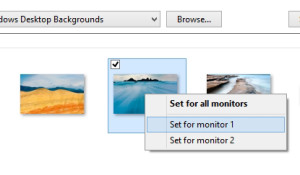
If you are making use of multiple displays, you would have noticed that Windows will extend your taskbar across both the screen. It has more than this, you can easily move your current app to another monitor. Moreover,  if you check out the Background section, you can choose separate backgrounds for both the screens.

Run Auto Maintenance on Schedule :
automaintenance

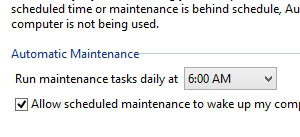
Windows 8 offers a completely new attribute that runs automatic maintenance tasks such as security scanning, software updates, and other diagnostic task daily. You can set the time as per your own convenience. Maintenance of your system can be performed manually from the Action Center.

Personalize Your Applications in The Search Bar :
cyY7k

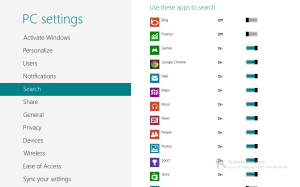
While you start searching from the Start screen, you will be able to see a list of different applications that are under the search bar. Click on any of them, and you will be able to search those with similar terms in the particular application.

Hide All Your Recent Data From The Jump Lists :
original

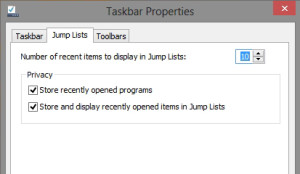
Windows 7 came up with a great feature of Jump Lists that aided users to boost their system’s productivity, but their ‘Recent Items’ aspect was likely a privacy concern. Its just like you do not want others to view some files or document you recently viewed. With Windows 8, users have been able to personalize Jump Lists easily as compared to Windows 7, providing them with ease to hide their recently viewed files and accessed programs.

Tweak Different Rows Right On Your Start Screen :
m2

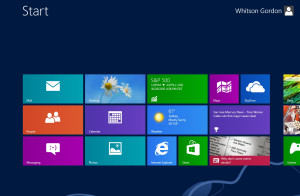
By default, your start screen would fill your display with several different rows of tiles as you can easily fit in, the capacity is up to 6 rows. You can bring down the number, perhaps you have an amazing background, or simply do not want to have so many rows, you can easily tweak the number of rows by editing the Registry.

Quicker Snapshots :
m3

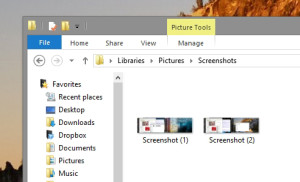
For a pretty long time, Windows had offered an illogical screenshot shortcut, where users had to press over the Print Screen button, then open another app such as GIMP or Paint, and then paste the screenshot from the clipboard. But, now with Windows 8, users can easily take a screenshot of any screen and then it will be automatically saved in the Pictures folder in PNG file format.

Google Vs. Apple Maps – Which One To Opt For?

The Google Maps app was made available in the Apple’s App Store last week, and it was a pretty joyful moment for the cyberspace. The proof of this is that just after a few hours of availability, Google Maps turned out to be the most downloaded application for the iOS devices, and most of the users simply banished their Apple Maps application into a folder that keeps Compass, Reminders, and other unnecessary and un-deleteable apps Apple integrated.

Is Google Maps app really an improvised app in comparison to what Apple offers? To figure it out, continue reading this post, and you will have a better idea. What I have been able to analyze is that Google holds superiority, in presentation, spend, and most imperatively, in accuracy. It does not mean that the Apple’s mapping app is hideous or awful. It’s just that Google Maps application is refined and flawless where Apple;s default maps feel deficient and patchy.

Google Maps is Easier and Cleaner Than Apple :

Apple is a big name, it has constructed its present empire on, its clarity and crisp design of its products. But, with the comes to mapping services, Apple seems to be far behind. Google, on the other hand, is being easy to use and simplicity to its users. Google Maps happens to be more austere with a pretty straightforward display compared to what Apple offers to its users.

Google Offers A Quicker Search With Accurate Results :

Google commenced as a search company and has accumulated tons of data over the past years, so it is no big surprise that the Google Maps app is generally more consistent and reliable in comparison to Apple Maps while you are searching for either a specific address or location name.

Getting There With A Push :

Apple has been quite useful with its mapping service, as it provides turn-by-turn directions. The voice navigation feature on Google Maps app sounds and looks same as Apple’s. Google Maps offers a push which is useful for superior navigation.

Google Maps offer public transit-takers a better advantage. Google offers the public feature, whereas Apple Maps app does not. The Google Maps application can map out directions for users and even show nearby transits, whereas Apple Maps is going to shuttle you off to a completely different application, which users are forced to choose themselves.

Windows 8 App’s Security Not Much Better Than iOS and Android Apps

An earlier Microsoft employer who is now an engineer at Nokia named Justin Angel has recently drawn attention towards the problem of hacking and piracy in windows 8 applications on windows store. He says that there were some illegal changes made to the application like trial applications changed to full version applications, the in-app purchase prices changed and the integrated ads removed.

In order to compete with the other operating systems of the time, these applications are very beneficial. There are tons of apps available on windows store that are constantly being updated and users can see the ratings of the apps so it becomes very easy to access them.

Justin Angel’s focus was the game applications that are the best example of the issues he mentioned. For instance, there is one game application named ‘Ultraviolet Dawn’ that features game cash that a player can use to buy advance equipment for the spaceship. They are available in different amounts and stored in data files. The pirated version of these apps contains changed and lower price of the currency. It uses XML to store the modified data. Another example of the violation is the game Minesweeper from which the game ads were removed. The changes can be made easily using Notepad. This similar attack can also be made to the windows store apps.

There is another game called ‘Soulcrafts’ that is similar to the ‘Ultraviolet Dawn’ and it features the in game currency with the difference that player uses real money to buy things. The currency settings were also modified in way that player could purchase them free. The game also features the player profile that can also be change. Due to all these attacks, the application developer has to face the loss.

DRM is developed to save and protect the applications from being hacked. All the coding and algorithm is available in the windows. That is why it is not very difficult to decode it and make changes to it. Another way to overcome this problem is not to provide the necessary information to the windows but this only result in difficulty for the developer. Justin angel highlighted one solution to the problem that games should either be available free or come with paid versions which requires payment to be made once. That means the in app purchases should be avoided.

These are very serious problems and it is difficult to stop them. Microsoft can take some actions on its end to minimize these attacks. To avoid these issues, Microsoft should sign the applications in windows store.

AT&T’s Brings Android Jelly Bean Updates For Motorola ATRIX HD Subscribers

AT & T users who own the Motorola ATRIX HD, it’s time to update for Android 4.1 Jelly Bean. This update would make the Motorola ATRIX HD fourth Jelly Bean smartphone. However peoples are expecting the Motorola ATRIX HD to get Jelly Bean updates sooner rather than later. Because Motorola already announced that it would be available for those in United Stated beginning of December, Well its great news, Jelly Bean update has arrived for AT & T carrier subscribers who own Motorola ATRIX HD.

Motorola AT & T Motorola ATRIX HD update brings Google Now, Project Butter, Enhanced Notification, Improved battery performance & life, enhanced phone camera with auto focus, filmstrip mode for gallery and much more.

its recommended you to connect with Wifi before trying to apply this upgrade, you can easily head over to “Settings > About Phone > Select Software update” .

Verizon Galaxy S3 Jelly Bean Update Brings; Google Now, S Voice, Enhanced Notifications

If you are Verizon Samsung Galaxy S3 owner, then Verizon carrier has most beautiful gift for this Christmas: the latest update of Android Jelly Bean 4.1. Maybe you already knew that, Samsung Galaxy S3 device was launched with Android Ice Cream Sandwich 4.0 OS. Samsung has already updated unlock variant to the latest Android 4.1 Jelly Bean, But the owner of Verizon carrier still waiting for their respective Carrier to approve and start rolling out to latest one.

We’ve already described Jelly Bean features in our previous post, However Jelly Bean 4.1 brings as number of latest features to the Samsung Galaxy S3 device including, Google Now, Google built-in digital assistant resembling Apple Siri, Android 4.1 also updates notifications on the phone, allowing you to return missed call and e-mail directly though notification window.

Surprisely, Sprint & T-Mobile were the first carries in United States to get latest updates of Android. On the other side, Verizon failed to fulfilled promises to roll out the updates on time. So it’s good news for the Verizon carrier users, finally rolled out the Android Jelly Bean update for the Galaxy S3.

This Latest update is numbered “JRO03L.I535VRBLK3“. The upgrade can by easily download by OTA, But first make sure that your smartphone has at least 50% battery. According to some source, Jelly Bean upgrade will start being pushed to devices Friday, if you’ve not yet received or noticed updates then just go to “Settings > About Device > System updates” and try to install it manually.

Please let us know, if you get it and what you think about latest update.